A quick operator walkthrough

Start with the presentation.

Keep the client’s PowerPoint or Keynote file authoritative, then attach media, cues, confidence views, named output presets, and control. The intended rig uses separate Control, Main, and Backup Macs; Local Main is an optional smaller setup.

macOSThree-Mac rig or Local MainKeynote · PowerPoint · PDF
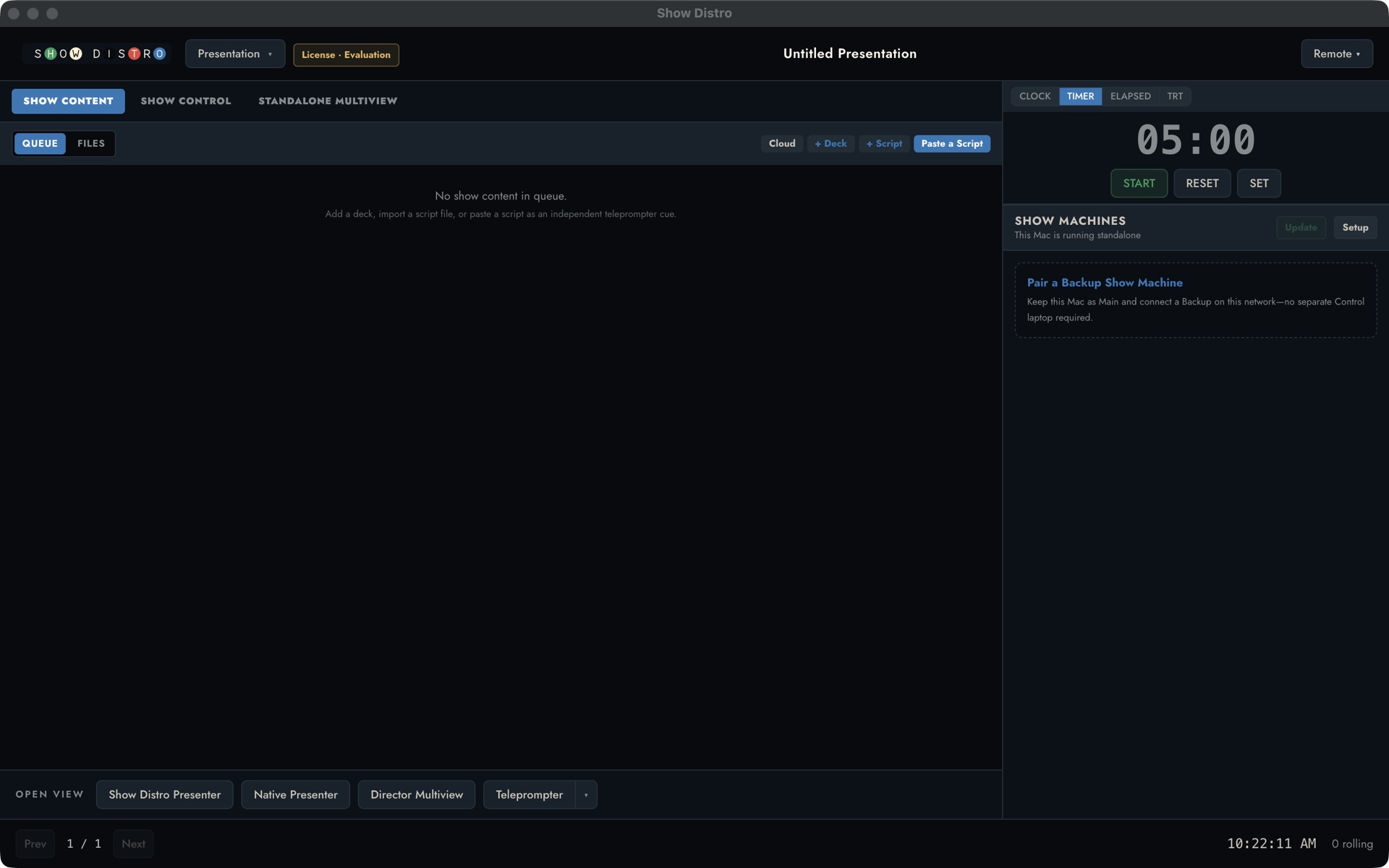
The actual Show Distro Control application on macOS
ACTUAL PRODUCT INTERFACESHOW DISTRO CONTROL · MACOS
Product tour

See what the operator controls.

This earlier interface tour shows the active deck, presenter notes, sections, media cues, timer, and presenter and director views. It predates the current Output Presets interface and local-Main setup choices described below.

What Show Distro does

The presentation is the spine. Show Distro builds the show around it.

Content teams keep their familiar authoring workflow while production adds a non-destructive, revision-aware show layer.

  • Keep the native deck authoritative. Keynote and PowerPoint stay in their native Mac apps and remain the client-owned source of truth.
  • Attach production intent. Bind guarded video, external media, audio, lighting, routing, presenter views, scripts, notes, timers, and messages to the presentation.
  • Review revisions before Show Ready. Slide and section mappings that still resolve decisively carry forward; changed or ambiguous addresses require operator review.
  • Operate the integrated show. Coordinate separate Control, Main, and Backup Macs—or use Local Main in a smaller rig—with Director, Stream Deck, Companion, and production protocols from one workspace.
The workflow

Prepare it once. Run the show from one place.

01Check

Choose the show layout

Prepare separate Control, Main, and Backup Macs for the intended rig, or use Control + Local Main with a separate Program display. Confirm macOS access and the Program, Presenter, and teleprompter display routes.

Local or distributedDisplaysmacOS access
02Load

Load the decks

Add Keynote, PowerPoint, or PDF decks; attach scripts and external videos when needed. Resolve review warnings, then prepare every configured destination and confirm Show Ready.

DecksProgressShow Ready
03Shape

Build output looks

Save named Output Presets for Program, Presenter, Teleprompter, and configured extra display or NDI outputs. The list starts empty. A saved look adds a button and can also be recalled by a slide cue.

ProgramPresenterSlide cues
04Run

Run the show

Start the configured show group, advance the confirmed deck, watch the live outputs, and keep the director and presenters in step. Rehearse the exact rig before live use.

ControlShow groupOutputs
During the show

Keep useful information close and distractions out of the way.

▦
Presenter views

Layouts that change with the show

Save a layout for each presenter and recall a different one from a deck or slide when the show changes shape.

≋
Notes + teleprompter

Notes controlled by the operator

Move Presenter View notes and full-screen Teleprompter scripts by click, keyboard, or remote control, with predictable steps and an emergency stop.

▶
Video

A deliberate video cue

Use a click-triggered video inside Keynote or PowerPoint, or bind an external video for Show Distro to play. Show Distro warns the operator, tracks TRT, and can hold the presenter’s forward click until the cue is rolled. Turn the hold on or off for each show.

◉
Show machines

Files where they need to be

Send decks, scripts, notes, and presenter layouts to Main and Backup before loading from Control. Local Main is available for smaller rigs.

▦
Director

A multiview with context

Watch Program, Presenter, and the Light Table; track TRT and video; send a clear message to the presenter.

◎
Timing

Clocks where they matter

Place the clock or countdown each presenter needs without forcing everyone into the same layout.

Private rehearsal preview · macOS

Help qualify it on the real rig.

We are arranging supervised rehearsal previews while native output and multi-machine qualification continues. Share the intended Macs, displays, presentation apps, teleprompter controls, and fallback plan before show day.